Our story
Built by engineers, for engineers.
Studio Stream was created by music producers and sound engineers who got tired of the export-send-wait loop. We built the tool we wished existed — because we need it too.
Stream lossless 24-bit audio and your DAW screen to any client — no installs, no accounts, no files. Just a link.
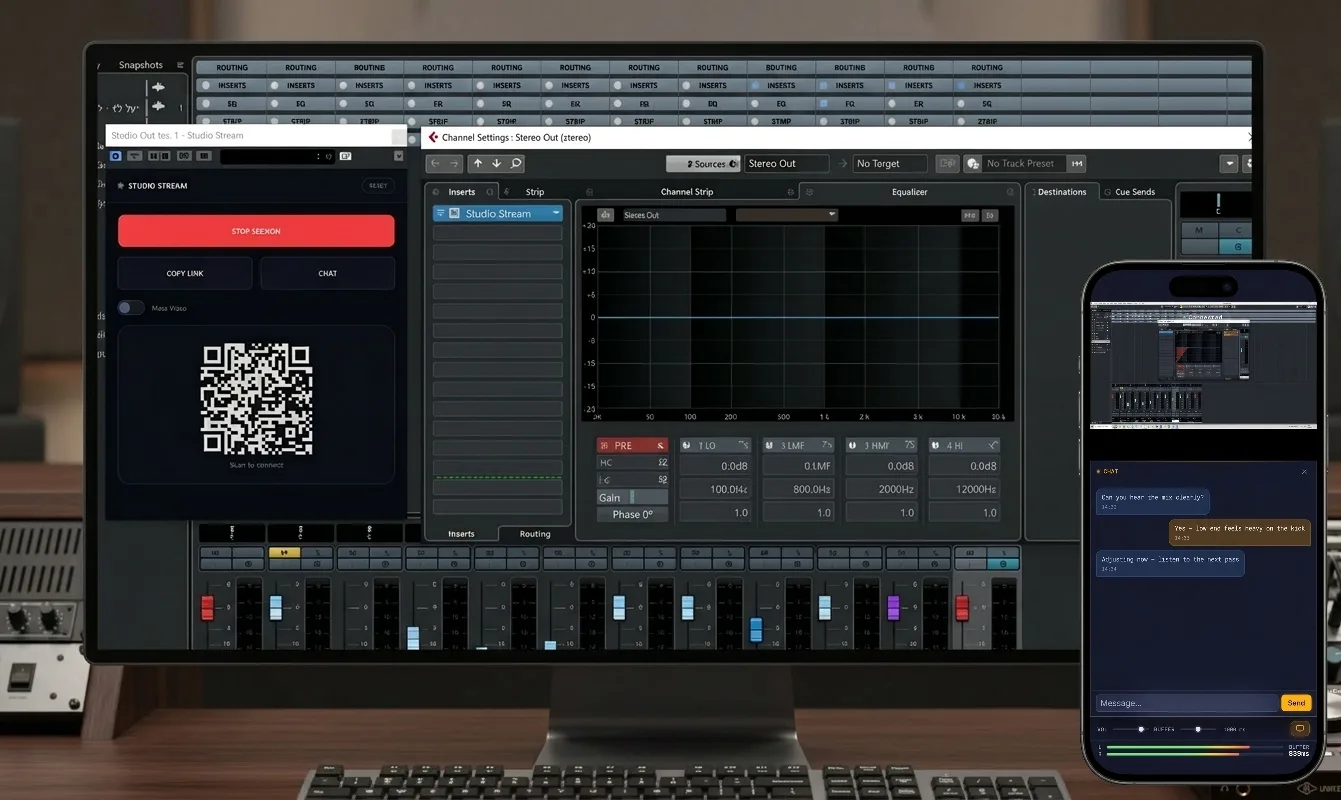
Export, upload, wait for the client to download, listen on laptop speakers, get notes over WhatsApp — then do it all over again.
Quality gets crushed in compression. Your client never hears the real mix — just an approximation.
No way for the client to see what you're doing in the DAW. They hear changes but can't follow along.
Want to check the mix on phone speakers? Same painful export cycle — just to hear 30 seconds on a different device.
Insert Studio Stream on your master bus. It works like any other plugin in your chain.
Hit Start Session. Copy the link or scan the QR code — send it to your client or open it on your phone.
Your client opens the link in any browser. Full-quality audio and your DAW screen, instantly. No install needed.
Every feature designed for the way sound engineers actually work.
24-bit / 48kHz PCM. Bit-perfect. Not MP3, not Opus — the real thing, exactly as it leaves your master bus.
Your client sees exactly what you see — every fader move, every plugin tweak, in real time.
One link. Opens in any browser. No app to download, no account to create, no plugin to install on the client side.
Peer-to-peer — audio and video go directly between you and your client. No server ever touches your content. Perfect for pre-release material.
Start, stop, share link, scan QR, chat — everything from the plugin window. Zero disruption to your workflow.
Talk to your client without switching to WhatsApp or iMessage. Real-time messaging, right inside the tool.
Scan the QR code from the plugin, open on your phone, and hear the mix on phone speakers — live. Walk around the studio, step into another room. Hear something off? Walk back, tweak, hear the change instantly. No export, no file transfer. The end of the export-send-listen-repeat cycle.
You hit Start, send the link. They open it on their laptop, hear your mix in full quality, see your DAW screen, and give notes over the built-in chat. No files bouncing back and forth. No waiting for downloads. No quality loss.
Every engineer checks mixes on phone speakers — because that's how most people listen to music today. Scan the QR from the plugin, walk to the couch, and listen. Hear something off? Walk back, tweak, hear the change live. No export. No transfer. Instant.
Start a session, share the link, scan the QR, chat with your client — all without leaving your DAW.
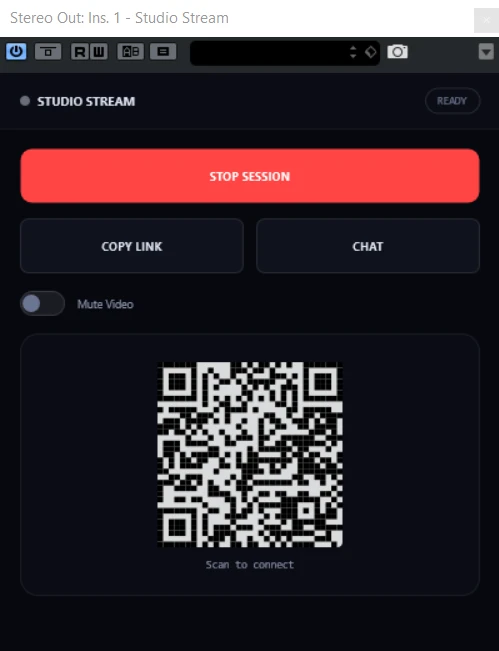
Studio Stream VST3 — Cubase
Studio Stream was created by music producers and sound engineers who got tired of the export-send-wait loop. We built the tool we wished existed — because we need it too.
Choose the plan that works for you — activate Studio Stream on your machines and start streaming lossless audio straight to your clients' browsers.
Currently in beta on Windows + Cubase.
macOS, Pro Tools (AAX), and more DAWs are on the way — your license covers them as they ship.